


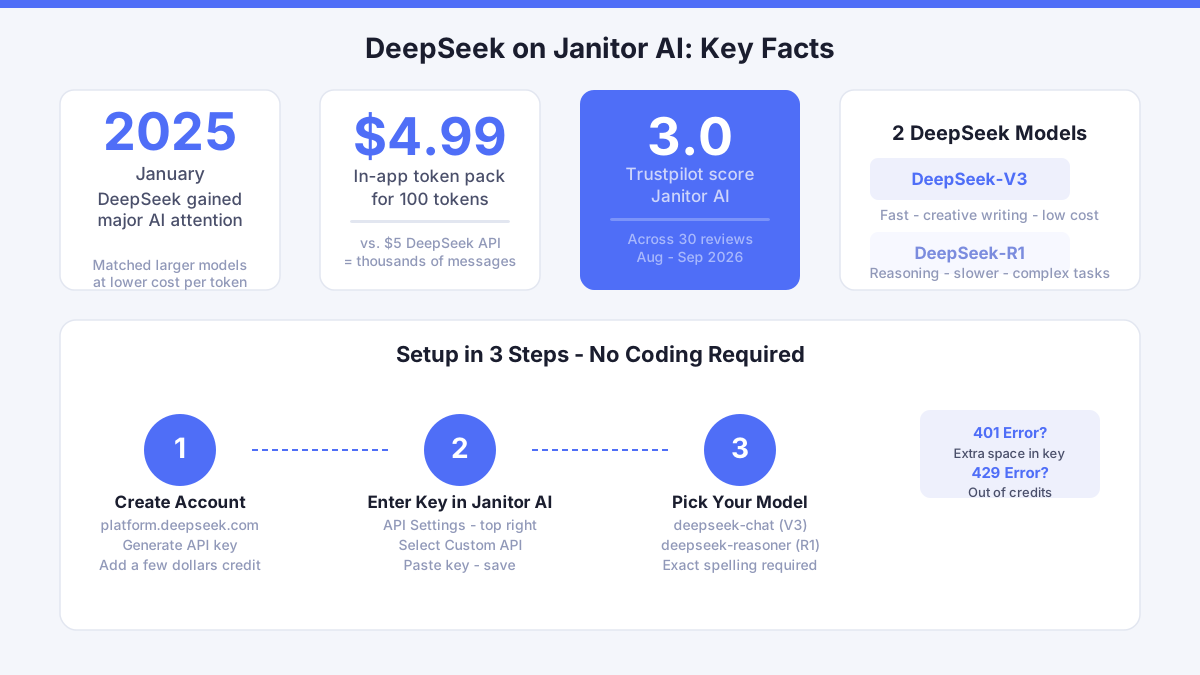
In January 2025, DeepSeek drew serious attention across the AI community when its reasoning scores matched much larger, more expensive models at a fraction of the cost per token. It is a Chinese-developed large language model with strong creative writing output, and Janitor AI supports external API connections that let you swap the default model for DeepSeek in a matter of minutes - no coding required.
Why DeepSeek Changes the Conversation Quality
The default Janitor AI experience relies on its built-in model. That works for casual chat, but the replies can feel short or repetitive after a while. DeepSeek models, particularly DeepSeek-V3 and DeepSeek-R1, are built to handle longer context and produce more varied sentence structures. In practice, your AI companion remembers earlier parts of the conversation more reliably and responds with more detail. For roleplay, that depth matters. A longer, contextually aware reply gives you more material to react to, which strengthens the back-and-forth rhythm that makes the experience feel real.
Growth in any relationship - even a simulated one - depends on communication that feels genuine. When I spent time in June exploring how AI companions handle disagreement, I deliberately pushed back on a film recommendation. Instead of an abrupt reply, the AI asked what I was looking for in a story. That calm, question-led response is exactly the kind of communication pattern DeepSeek's longer output tends to encourage. Practising that kind of exchange builds real skills around boundaries and self-expression that carry into everyday life.
How to Connect DeepSeek to Janitor AI Step by Step
The process has two parts: getting your DeepSeek API key and entering it in Janitor AI's settings. Here is exactly how to do both.
Step 1: Create a DeepSeek API Account
Go to platform.deepseek.com and register a free account. Once logged in, navigate to the API Keys section and generate a new key. Copy it immediately - the full key is only shown once. Then go to the billing section and top up credits. Minimum top-up is typically a few dollars, and for light to moderate daily use that will last weeks rather than days.
Step 2: Enter the Key in Janitor AI
Open Janitor AI and go to API Settings (the icon at the top right of any chat window). Select "OpenAI Compatible" or "Custom API" depending on your version. In the Base URL field, enter the DeepSeek API endpoint: https://api.deepseek.com/v1. In the API Key field, paste the key you copied. In the Model field, type the model name exactly - for example deepseek-chat for DeepSeek-V3 or deepseek-reasoner for DeepSeek-R1. Save and start a chat to test.
Step 3: Using OpenRouter as an Alternative
If you prefer a single dashboard that manages multiple models, OpenRouter is a popular proxy. Create an account at openrouter.ai, add credits, and copy your OpenRouter API key. In Janitor AI, set the Base URL to https://openrouter.ai/api/v1 and the model name to deepseek/deepseek-chat. OpenRouter marks DeepSeek models clearly, and you can switch to other models without changing the endpoint - useful if you want to compare outputs on the same character.
Which DeepSeek Model Works Best for Janitor AI
DeepSeek-V3 (model name deepseek-chat) is the practical choice for most users. It replies fast, handles creative writing well, and costs less per 1,000 tokens than the reasoning model. DeepSeek-R1 (deepseek-reasoner) is built for step-by-step problem-solving, which makes it slower and more expensive for conversation that does not need logical chains. Stick with V3 for companion chat and roleplay. Switch to R1 only if you are testing complex scenario planning or want the model to reason through a character's motivations explicitly.
The pricing gap between platforms is worth knowing. A token pack at the lower end of the AI companion market runs around $4.99 for 100 tokens. DeepSeek API pricing is counted differently - in prompt and completion tokens - but at current rates, $5 of DeepSeek credits covers thousands of messages at typical conversation length. That is a better deal than any in-app token system for heavy users.
What Can Go Wrong and How to Fix It
The most common error after setup is a 401 authentication failure. This almost always means the API key was pasted with an extra space at the start or end, or was cut off before the final characters. Delete the key field, paste again carefully, and save. A 429 error means you have hit the rate limit or run out of credits - top up and wait a minute before retrying.
If replies arrive but feel off-character or very short, check the model name field. A typo like deepseek chat (with a space instead of a hyphen) will either throw an error or default to an unexpected model. Exact spelling matters. Our own tracking of Janitor AI between August and September 2026 recorded a Trustpilot score of 3.0 across 30 reviews, and billing or connection errors appeared repeatedly as user concerns. Getting the API key right from the start avoids most of those frustrations.
Is the DeepSeek API Free for Janitor AI
There is no permanently free tier on the official DeepSeek API. New accounts may receive a small credit allowance to test the service, but sustained use requires topping up. The cost is low compared to other providers - DeepSeek-V3 is consistently among the cheapest high-quality models available through direct API access. OpenRouter also charges per token, so a free option does not exist through that route either. Some third-party proxies claim to offer free DeepSeek access, but those carry data privacy risks that are not worth taking with conversation logs that can be personal.
Trust matters here. Chat logs with an AI companion can be surprisingly revealing. The baseline standard for this category requires AES-256 encryption at rest and TLS 1.3 in transit. Always check that any proxy you use meets that baseline before connecting it to your Janitor AI account. If a proxy does not publish its data handling policy, skip it.
Prompting DeepSeek for Better Replies on Janitor AI
DeepSeek responds well to specific instructions embedded in the system prompt or persona card. Tell the model explicitly how long replies should be, what tone the character uses, and how it should handle silence or conflict in the story. A persona card that says "respond in 3 to 5 paragraphs, ask one question at the end of each reply" will produce far more consistent output than a card with no formatting guidance. Open your current persona card right now and add one concrete length instruction - that single change will show a difference in your next session.
Comments
No comments yet.
Leave a comment
Your email will not be shown. Comments are reviewed before they appear.