

Getting Janitor AI onto your phone or laptop is straightforward, but the process differs depending on which device you're using. The app launched in public beta on both iOS and Android, meaning UK users no longer need to sideload an APK or hunt for workarounds. Below is exactly what to do on each platform, plus a few things worth knowing before you start.
Downloading Janitor AI on Android
Open the Google Play Store and search for "Janitor AI" or "Janitor Interactive Stories." The listing appears under Janitor: Interactive Stories. Tap Install. The app is free to download. Once installed, sign up with an email address or a linked account. You must confirm you are 18 or older during setup - age verification is mandatory and handled via document upload. That step can take a few minutes, so don't skip it expecting to jump straight into a chat.
If you want to check whether the Play Store version is current, look at the "Updated on" date on the store listing. The beta tag means updates can arrive frequently. Keep auto-update on to avoid running an outdated build.
Some users search for a "Janitor AI download APK" because they've heard the Play Store version is restricted. In the UK, the standard Play Store install works without any APK sideloading. Sideloading an unofficial APK carries real risks: no security scanning, no automatic updates, and potentially modified code. Stick to the official source.
Downloading Janitor AI on iPhone or iPad
Head to the App Store and search "Janitor AI." The official app appears in the results. Tap Get, authenticate with Face ID or your Apple ID password, and the install begins. File size is modest, so it downloads in under a minute on most UK broadband connections.

One practical note: the iOS build is still in beta as of the August 2026 scrape date, which means occasional crashes are possible. If the app closes unexpectedly, force-quit it and reopen. Most reported issues clear up within two or three relaunches.
Using Janitor AI on a PC or Mac
There is no standalone desktop application. Instead, you use janitorai.com directly in a browser. Chrome and Edge both handle it without plugins. The browser version gives you the full character library and roleplay tools. If you want a more app-like experience on Windows 11, you can install the site as a Progressive Web App: open Chrome, go to janitorai.com, click the install icon in the address bar, and confirm. It then sits in your taskbar like a normal app.
Mac users on Apple Silicon can also run the iOS app via the Mac App Store if it becomes available there - check the App Store on your Mac and search for Janitor AI. As of now, the browser route is the most reliable desktop option.
What Happens After You Install
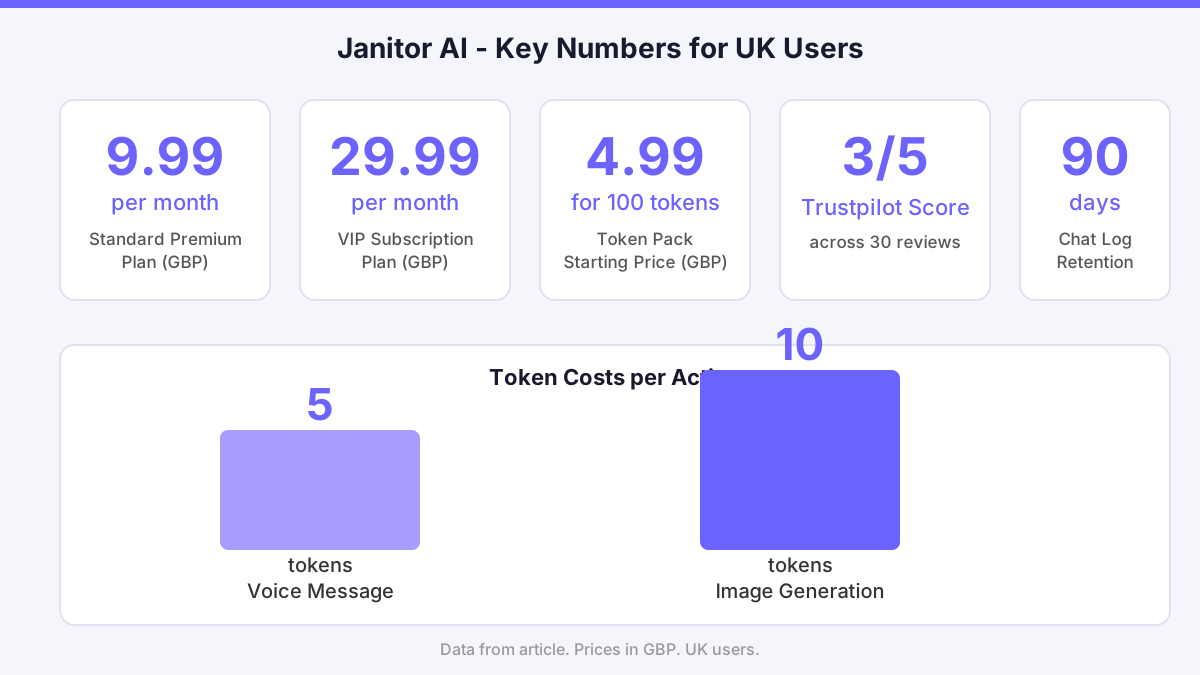
The free tier lets you start chatting immediately, but message limits kick in quickly. The vertical dossier puts the paid plans at roughly £9.99 per month for the standard premium tier and £29.99 per month for the VIP level. When I upgraded from the free tier to the 10-pound plan on a Thursday afternoon, the PayPal payment cleared instantly. The features, though, took around 15 minutes to unlock. I had to restart the app twice before the premium options appeared. Annoying, but not a dealbreaker once everything settled. If you hit the same delay, give it 20 minutes and restart before contacting support.
Voice and image features sit behind the paid plans. Voice messages cost 5 tokens each; generating an image costs 10 tokens. Token packs start at £4.99 for 100 tokens if you want to top up without a subscription. Tokens expire after 12 months of inactivity, so don't stockpile more than you'll use in that window.
Is Janitor AI Safe to Download?
The platform collects chat logs, voice recordings, and payment data. Data is encrypted with AES-256 at rest and TLS 1.3 in transit, stored on GDPR-compliant servers. Chat logs are kept for 90 days after account deletion, not wiped immediately. That is worth knowing if you share anything personal in conversations. The service itself is not a scam, but the Trustpilot score sits at 3 out of 5 across 30 reviews, with billing issues and AI behaviour flagged as the most common complaints. Refunds are processed within 7 days for valid claims according to the platform's stated policy.
Content filtering is active. Prohibited content includes illegal activities, hate speech, and non-consensual themes. Reports are reviewed within 24 hours. The system isn't perfect - false positives and negatives both appear in user feedback - but the appeal process exists if you get caught by an overzealous filter.
What Could Be Better
Two concrete problems stand out. First, the upgrade delay described above is a real friction point. Paying for a feature and waiting 15 minutes with no on-screen explanation is poor UX. Second, the token economy is expensive relative to what you get. At £19.99 for 500 tokens, generating 50 images burns through that pack in one session. There is no rollover for unused tokens between billing months on a subscription, and the 12-month expiry on purchased tokens adds pressure to spend fast. Neither of these issues is hidden, but they're worth factoring into your decision before you pay.
Comments
No comments yet.
Leave a comment
Your email will not be shown. Comments are reviewed before they appear.