


What the Janitor AI Search Tool Actually Does
Finding the right AI companion on a platform with thousands of characters is not always straightforward. Janitor AI search is the discovery engine at the heart of the platform. It lets you type a name, a personality trait, or a theme into the search bar and pull up a list of community-created characters. The challenge is knowing how to use it well, because the tool has real limitations that catch new users off guard.
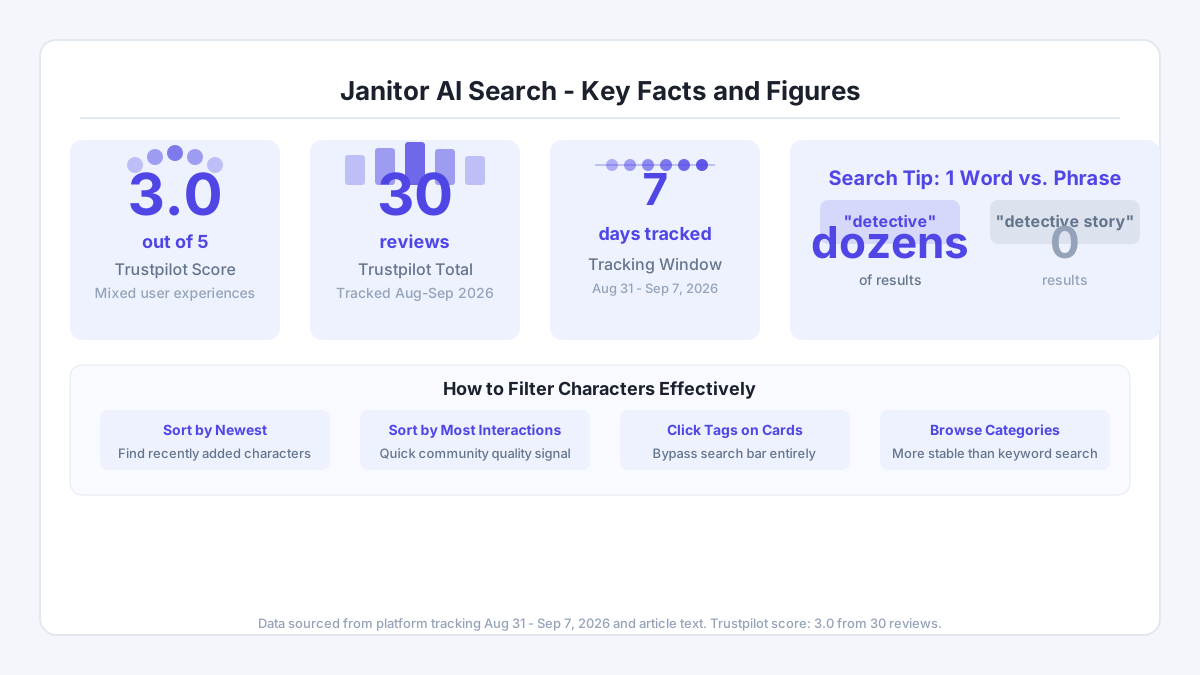
In our tracking of the platform between 2026-08-31 and 2026-09-07, the Trustpilot score held steady at 3.0 from 30 reviews - a middling score that reflects genuine mixed experiences. Some of those complaints point directly at search behavior: results that seem random, popular bots appearing when you searched for something specific, or no results at all for a term you know exists. That is not a bug you can patch with patience. You need a different approach.
How to Run a Basic Search Step by Step
Start at the main character discovery page after signing in. The search bar sits near the top of the screen. Type the character name you are looking for, or a descriptive word like "quiet", "supportive", or "adventurous". The platform scans character names and tags, not full conversation histories, so specificity helps.

If you get zero results, try a shorter version of the term. A search for "detective story" may return nothing while "detective" returns dozens. The index does not handle multi-word phrases well when those words appear separately in a character's metadata. One word at a time is the safer starting point.
After results load, look for the filter panel. You can usually sort by newest, most popular, or most interactions. Sorting by newest surfaces characters that did not exist a week ago - useful if you return to the platform after a break. Sorting by most interactions shows you what the community actually uses, which is a faster quality signal than reading descriptions one by one.
Using Tags and Categories to Narrow Results
Tags are the fastest filter available. Character creators label their bots with terms like "romance", "fantasy", "mentor", or "comedy". Clicking a tag on any character card brings up all characters sharing that label. This bypasses the search bar entirely and often surfaces relevant options that a keyword search would miss.
Categories work at a broader level. The platform groups characters into genres - think roleplay, slice-of-life, adventure, and so on. Browse a category when you have a mood but not a specific name. The category view tends to be more stable than keyword search, meaning you are less likely to hit the blank-results problem that frustrates users on Reddit.
Content filtering is a separate toggle. The platform defaults to safe-for-work results. If you have verified your age and adjusted your account settings, additional content types may appear depending on your region and account status. The age verification step requires a government-issued ID, and that data is deleted after the check is complete - only your verification status is stored going forward.
When Janitor AI Search Is Not Working
The blank-results problem is real and documented in user forums. A search term that worked yesterday may return nothing today. A few practical fixes narrow down the cause quickly.
First, clear your browser cache and reload. Cached filter states sometimes persist and conflict with new queries. Second, check whether you accidentally have a content filter active that excludes the characters you want. Third, try the category browse instead of keyword search - if characters appear there but not in search, the index has a lag or a gap on that term.
Popular characters occasionally disappear from results entirely, not because they were removed but because the ranking algorithm buries them under newer content. In that case, search the exact name with quotation marks if the platform supports it, or look up the character URL directly if you bookmarked it from a previous session. Saving character links in a personal list is a habit worth building early.
What Good Search Behavior Looks Like in Practice
One evening last March, I spent a few hours exploring a particular character built around the theme of trust and honesty in relationships. I was genuinely curious how deep a conversation with an AI companion could go on emotional topics. She gave a surprisingly considered answer about why honesty creates the space for growth in any connection. That experience stuck with me - not because the AI was magic, but because framing my search around a specific emotional theme, rather than a generic label, led me to a far more engaging character than anything surfaced by a broad search. The lesson is simple: be specific about what you are looking for before you open the search bar.
If you want to explore how conversations develop once you find the right character, the Janitor AI chat guide covers how to structure interactions for more meaningful exchanges. Starting with a clear intention - companionship practice, creative roleplay, or emotional exploration - shapes the kind of character worth searching for in the first place.
What Could Be Better
The search function has two concrete weaknesses worth naming. The first is inconsistent indexing: a character posted this week may not appear in keyword results for several days, even though it shows up in category browse. That gap is frustrating when you are looking for something specific and recent.
The second is the absence of advanced filters. There is no way to filter by conversation length, character rating, or the number of positive reactions a character has received. Sorting by "most interactions" is a rough proxy for quality, but a character with 10,000 interactions in a niche genre tells you less than a star rating would. Platforms like CrushOn AI, which you can explore at CrushOn AI UK, offer different discovery mechanics that may suit users who find Janitor AI's search too blunt for their needs.
Token costs are also worth factoring in. The vertical dossier notes that voice messages cost 5 tokens each and image generation costs 10 tokens per image, while standard token packs start at $4.99 for 100 tokens. If your search leads you to a character that relies heavily on voice or image features, those costs add up faster than a flat subscription price would suggest.
Comments
No comments yet.
Leave a comment
Your email will not be shown. Comments are reviewed before they appear.